
Key Takeaways
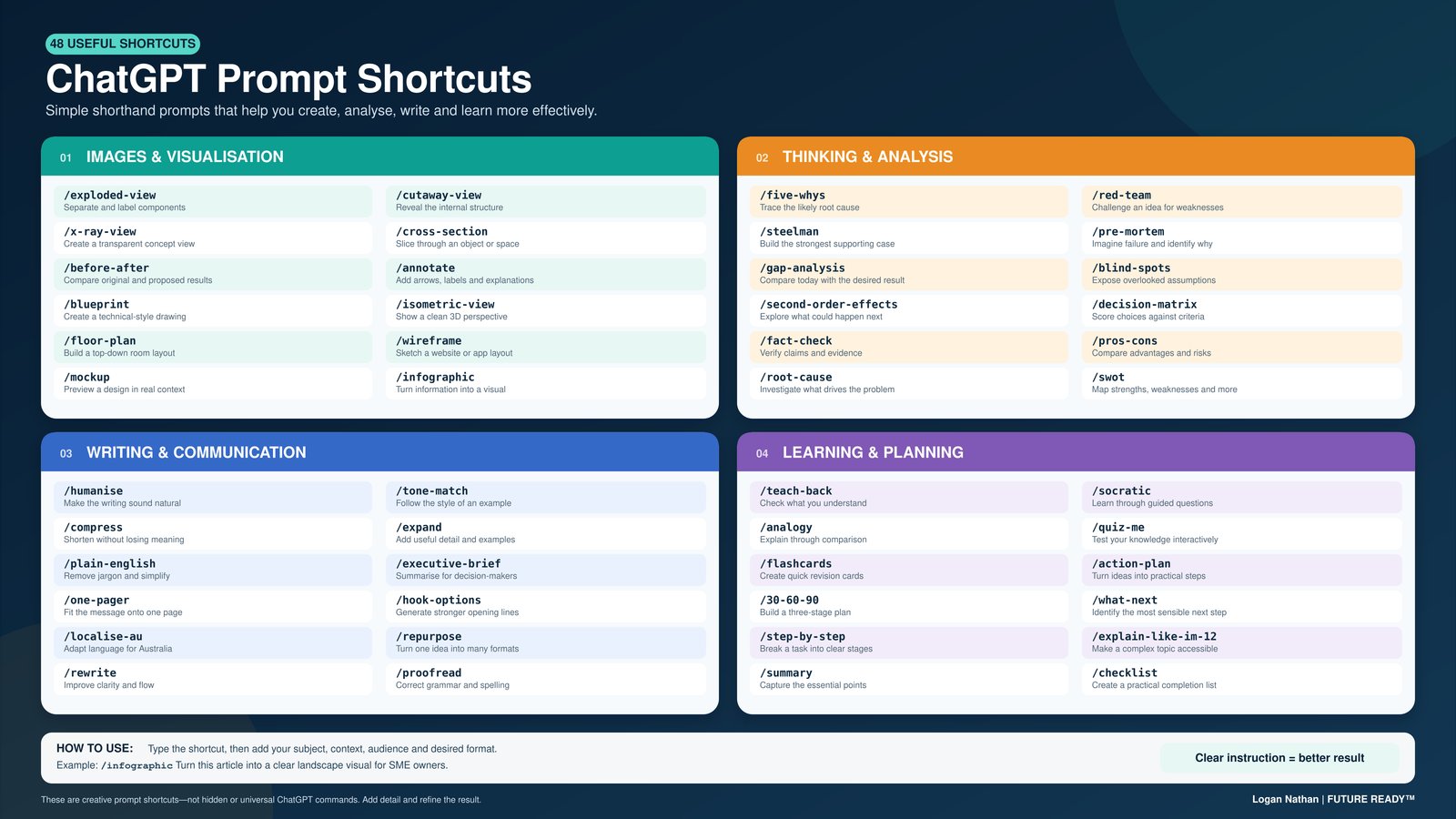
- 48 simple ChatGPT prompt shortcuts can significantly enhance AI interactions.
- Shortcuts are not commands but serve as guides for better AI responses.
- Integrating shortcuts into workflows can boost productivity and efficiency.
Key Answer
Enhance your ChatGPT experience with 48 simple prompt shortcuts worth knowing. From visualisation to communication, these shortcuts clarify your intent, maximising AI efficiency.
Navigating the digital world often requires more than just asking questions and hoping for the best responses. When it comes to using ChatGPT, clearer instructions can lead to better outcomes. Here, I’ve compiled 48 simple ChatGPT prompt shortcuts worth knowing to enhance your AI interactions and maximise productivity.
These shortcuts cover various needs: from images and visualisation, to thinking and analysis, writing and communication, as well as learning and planning. They’re not universally recognised commands, but easy shorthand instructions that help ChatGPT understand what you’re aiming to achieve.
Why Prompt Shortcuts Matter
Most users approach ChatGPT by typing queries and awaiting replies. While this is effective, it’s not the most efficient way to leverage the AI’s capabilities. Clear and concise instructions can drastically improve the quality of responses you receive.
Prompt shortcuts act as tools to streamline communication with ChatGPT, saving time and reducing ambiguity. With these shortcuts, you’re essentially providing the AI with a clear map of what outcome you desire. Good prompting is about being precise, not about learning overly complex technical jargon.
Images and Visualisation Shortcuts
Visualisation is a powerful method to convey ideas. ChatGPT can help bring clarity through visual breakdowns. Here are some handy shortcuts:
/exploded-view – This shortcut separates and labels the parts of an object, offering a detailed view that is easy to understand.
/visualise-steps – Use this to break down a process into visual steps, making it easier to follow.
/compare-graphics – Ideal for creating side-by-side graphical comparisons, enhancing clarity.
Expert Perspective
AI Efficiency Expert
In my experience, adopting simple prompt shortcuts can revolutionise how one interacts with AI tools like ChatGPT. These shortcuts not only improve efficiency but also enable more precise and effective communication, aligning perfectly with the trend of AI-assisted productivity.
Thinking and Analysis Shortcuts
These shortcuts are designed to enhance analytical thinking by diving into the core of issues:
/five-whys – Perfect for exploring the root cause of problems by repeatedly asking ‘why’.
/mind-map – Create a visual representation of thoughts and ideas, useful for brainstorming sessions.
/decision-tree – Excellent for visualising the outcomes of different decisions to facilitate more informed choices.
Writing and Communication Shortcuts
Communication should be clear and straightforward. These shortcuts simplify messages and improve writing:
/plain-english – Strips away jargon, making complex ideas easy to digest.
/email-draft – Helps in drafting concise emails with all necessary information.
/summarise – Provides a summary of lengthy texts, saving time and effort.
Learning and Planning Shortcuts
Planning and learning are made simpler with these shortcuts, enhancing your organisational skills:
/action-plan – Transforms an idea into a practical series of steps.
/study-guide – Helps create a structured guide for learning any subject.
/timeline – Maps out a series of events or tasks chronologically, ensuring nothing is overlooked.
Incorporating Shortcuts into Workflow
Integrating these shortcuts into your daily routine is simple. By doing so, you can save significant time and ensure your instructions to ChatGPT are always clear. This not only improves the quality of AI responses but also enhances your productivity.
For those wondering which AI tools are worth paying for, these shortcuts provide a cost-free method to improve AI efficiency without additional expense.
Beyond the Basics: Advanced Shortcuts
Once you’re comfortable with the basics, there are advanced shortcuts that can optimise your experience further. These include integrating prompts into ChatGPT’s settings to eliminate repetitive commands entirely.
As the digital landscape evolves, staying updated with new tools is crucial. You might find inspiration from lessons learnt in AI’s evolving trends.
Frequently Asked Questions
They are simple shorthand instructions to guide ChatGPT for more precise and efficient responses.
By providing clear instructions, prompt shortcuts reduce ambiguity, making AI responses more relevant and accurate.
No, they are not built-in commands but suggested instructions to enhance interaction with the AI.
Yes, incorporating them can streamline your processes and improve productivity.
No, these shortcuts offer a cost-free way to improve your AI interactions.
Sources & Further Reading
#ChatGPT #AILiteracy #Prompting #ArtificialIntelligence #DigitalSkills